
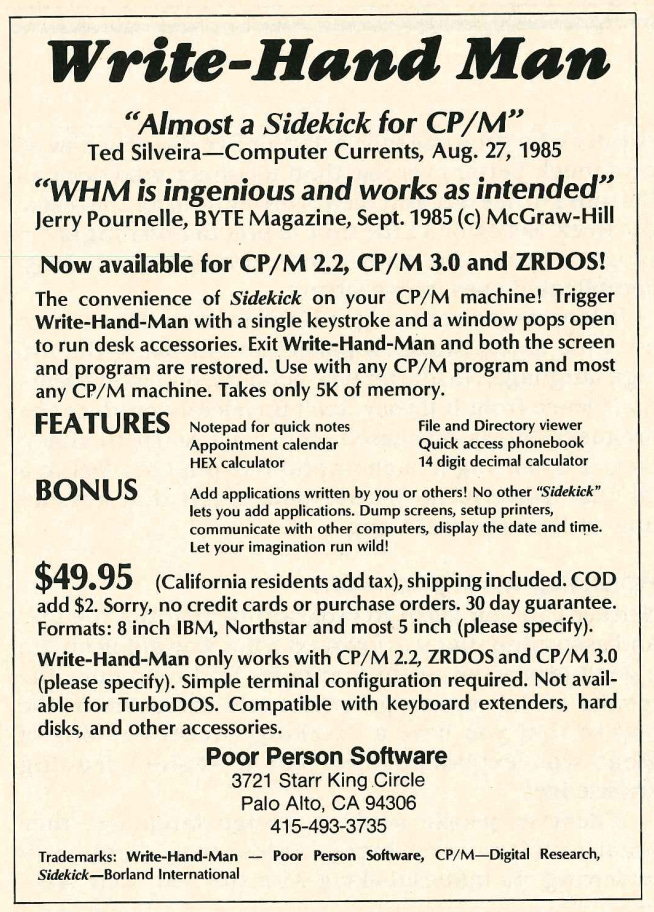
Poor Person Software's Write-Hand Man
"Almost a sidekick for CP/M"
Don’t forget to take advantage of the Black Friday/Birthday Sale. Get 39% off annual paid subscriptions between now and December 8th.
The Company
Poor Person Software is another computer software company from the 1980s with no information. You’d think that a company with that kind of name would have an interesting history. Even the California Secretary of State didn’t have anything about it.
The only thing I could find out about the company was a story from a customer in the Letters section of MicroCornucopia for April 1986. Sidney Balcom of Alexandria, VA started off by complaining about a retailer failing to issue a refund for faulty software. Then, they told a good customer story:
A not-so-bad story: Poor Person Software (Micro C advertiser) told me up front that their software might not run on my Turbo DOS system. They were right. I shipped it back, erased it from my system, and was promptly refunded the entire price, including shipping.
The Application
Write-Hand Man was a small utility that allowed CP/M users to access simple applications, such as a notepad and a calculator. These applications didn’t take over the screen. Instead, they appeared in the upper left corner, making it look like the user was multitasking. According to a manual I found, the application was written by Alan Bomberger.
The first mention that I found was a product announcement in the March/April 1985 issue of The Portable Companion:
Poor Person Software introduces a “desk accessory utility” for CP/M systems called Write-Hand-Man. With it you can suspend any CP/M application program and execute accessory programs ranging from communications to mini-databases. The application program is unaffected — Write-Hand-Man gives the illusion of concurrent execution.
Write-Hand-Man is distributed with six accessories: notepad, phonebook, desk calendar, file and directory viewing programs and a communication program. New accessories can be added by any user familiar with CP/M programming techniques, and new accessories may be developed by Poor Person Software.
Write-Hand-Man is priced at $49.95.
The June 1985 issue of Dr. Dobb’s Journal has a similar announcement:
CP/M users needn’t feel left out in the cold by the latest fad of pop-up programs. Poor Person Software has announced Write-Hand-Man, which includes a notepad, phone book, desk calendar, file and directory viewing programs, and a communication program. Users familiar with CP/M programming can add new functions. Write-Hand-Man requires CP/M 2.2 and will run on all CP/M machines. The price is $49.95. The program is available from Poor Person Software
I found a mention of Write-Hand Man in the December 1985 issue of I/O, a Japanese magazine: (translated via Google Translate)
Write-Hand-Man
This month, we will introduce a rather unusual piece of software. This software is similar to Sidekick, a program developed by Borland for the IBM PC. Using this program, you can call up functions such as a notepad, phone book, and calculator while an application program is running. The big difference between Write-Hand-Man and Sidekick is that it is written on CP/M80. This program was developed by a company with the unique name of Poor Person Software, which is literally a friend to users who don’t have much money. By the way, this program is reasonably priced at US$49.95. Let me translate the outline of Write-Hand-Man.
Walter J. Janowski wrote a review of Write-Hand Man for the May/June 1986 issue of Sextant:
Write-Hand Man
Like many of you, I drooled over the “desktop utility’’ type programs like SideKick that have been becoming available for the 16-bit machines running the Microsoft Disk Operating System (MSDOS). So, I was very interested when Poor Person Software of Palo Alto, California, released a Side Kick-like program for CP/M called Write-Hand Man (WHM).
Now, this type of program operates by tucking a relatively small program away in high memory and protecting it so that it remains in place ready to run even after another program is loaded into memory. However, in a CP/M environment, 64 kilobytes of memory doesn’t leave a lot of room to fool around; I was skeptical.
Fortunately, I got a chance to try it out. WHM has been configured for H/Z19 graphics and is being sold to the Heath/ Zenith community by Technical Micro Systems, Inc., of Ann Arbor, Michigan. I obtained a beta-test copy from the folks at Sextant.
While lacking the colors and graphics of SideKick and other similar programs written for MS-DOS, Write-Hand Man performs admirably in a CP/M environment. WHM provides a phonebook, notepad, appointment calendar, and calculator, as well as allowing you to view an ordinary ASCII text file or a disk directory from within an application program.
Imagine typing a letter to a friend on your word processor, striking one key to enter WHM, retrieve an address, phone number or note, make a calculation, etc., and then return to find your letter undisturbed, all with only one more keystroke. Write-Hand Man has a configuration program that supports the H/Z19 terminal and allows it to restore the original screen when you return to your application program.
By the way, TMSI has made some very impressive custom modifications to the version of WHM distributed by Poor Person Software.
In the “standard” version, all information is presented in the upper left hand corner of the screen, using standard ASCII characters. Also, the “View” function displays text in a format only 20 characters wide. In the TMSI version, the H19 terminal graphics are used very creatively to provide “Rolodex” cards, calculator displays, etc.—very similar to those in SideKick. Also, the View function displays text in the full 80 columns.
On the negative side, WHM is written in modular form, and each of its modules (notebook, calculator, etc.) is stored as a separate file on your disk. This makes its use rather time-consuming, particularly if you have older, slower disk drives. However, WHM should perform extremely well on a system equipped with a RAM disk.
So, have I bought myself a copy of Write-Hand Man?
Unfortunately, no. My main interest in the program was to use it with the public domain MODEM program. (I happen to be using MDM730.) I wanted to take notes, etc., while engaging in telecommunications.
Whenever I tried to use WHM and MODEM simultaneously, however, I would
lose characters of information coming in from my modem. This would occur whenever WHM was loaded in memory—even if it was not in use at the time.
Apparently, some of the memory management tricks used in WHM are not compatible with the MODEM program.
I may still purchase a copy, and at that point contact Poor Person Software for a fix on the MODEM problem. As of this writing, I have not contacted TMSI to see if they are aware of this problem or if there is a fix available. I hope to provide some additional information in a future column.
By the way, Write-Hand Man has no connection with a similarly titled product, Right Hand Man from Red E Products. I have had no experience with that product. (If you’re interested in desktop utilities, you might want to look at David R. Felstul’s “Software Roundup: Five Desktop Utilities for the Z100,” in Sextant #20, January-February 1986.)
In June of 1986, Ted Silveira wrote about the release of Write-Hand Man for Profiles.
Not to be outdone, Poor Person Software has released a new version of its pop-up desk accessory, Write-Hand-Man (version 2.1), with some new features. WHM can now dial numbers from its phone book, if you have a Hayes-compatible modem, and it also has a simple keyboard macro function that allows you to redefine eight keys with macros of up to 15 characters each.
And WHM now has a simple cut-and-paste function (more limited than Presto!‘s). You can cut up to 128 characters at a time from either the notepad or the view function and paste them into your application program. You can also cut the currently displayed value from the calculator.
Most interesting, WHM now has a unique “swap” function that lets you freeze your current application program while you run another program and then pick up your original application right where you left off. WHM works this trick by simply saving all your working memory (containing the current program and all the data it’s using at the moment) to disk and then restoring it when you’re ready.
If you’re using floppy disks only, you’ll have a noticeable pause while 50K or so of memory gets written to or restored from the disk. If you have a hard disk, the pause will be only momentary, and if you have a RAM disk, it should be practically undetectable. You have to be careful what you do when you freeze an application program like this because CP/M was never designed for such tricks. In particular, don’t start changing disks.
Presto! still has the edge over Write-Hand-Man in features and general polish because it’s specifically written for the Kaypro; on the other hand, Write-Hand-Man’s swap function is a feature you can’t get anywhere else in the CP/M world.
Computer Shopper mentioned the improved version of Write-Hand Man from Technical Micro Systems, Inc. in their October 1986 issue:
One of the reasons a good many hobbyists and other computer users initially give for changing from a CP/M system to an MS-DOS system is that the CP/M computer’s limit of 64K of memory is too small to allow memory-resident programs like Sidekick, (TM) to reside in the system and still allow useful amounts of memory for other applications. These programs, sometimes called by the generic term “pop-ups,” аге a great convenience. Once loaded and enabled, they lie there in memory, invisible, until you need them. When you are in the middle of another program, such as an editing session with a word processor or working with a spreadsheet or specialized database, you can call them up with a single trigger character, use the utilities such as a calculator, file viewing window, etc. and then return to your original program, undisturbed.
In 1985, Alan Bomberger of Poor Person Software, Inc. completed Write Hand Man, (TM) a pop-up that could do the same kinds of things as Borland’s Sidekick Program, but that would run on a CP/M system, but would take no more than 3K of memory space at any given time. This program has been very successful, and has already been widely. reviewed. Now Ross Towbin and Lee Hart at Technical Micro Systems, Inc. have released an enhanced, licensed version of Write-Hand-Man, called WHMT for short, which is specially tailored to take advantage of the capabilities of the Heath/Zenith H-19 Terminal Logic Unit (TLU). This runs under CP/M on computers like the H/Z-89, on machines like the H-8, and other, non-Heath/Zenith CP/M computers using an Н-19 terminal. It will also work with other terminals that emulate the H-19, though differences in keyboard layout and so forth may impose some limitations.
The TMSI enhancements are in four areas: 1. They have added a screen-restore function that does a better job of clearing the graphics and text left from your pop-up session and restoring you to your primary program than the original Write-Hand-Man did, 2. They have added features which take advantage of the H-19 character graphics; the phonebook display now looks more like a conventional Rolodex file, the calculator display is more realistic, etc. 3. They have added features to the pop-up utilities themselves, most noteably a character string search-and-find feature to the file viewing window that greatly enhances its usefulness, and, 4. They have provided more information on customizing the program and writing your own applications. The enhancements do come at a price; they add 2k or 3k to the memory space required, depending on how you have the system and your applications configured. Since a great many users will probably want to use a pop-up from inside a word processing program, this will reduce the available memory by the equivalent of one or two pages of text. Most users should find it a small price to pay for the added convenience.
Did you ever use Write-Hand Man? Tell us about it in the comments below.

What computer ads would you like to see in the future? Please comment below. If you enjoyed it, please share it with your friends and relatives. Thank you.